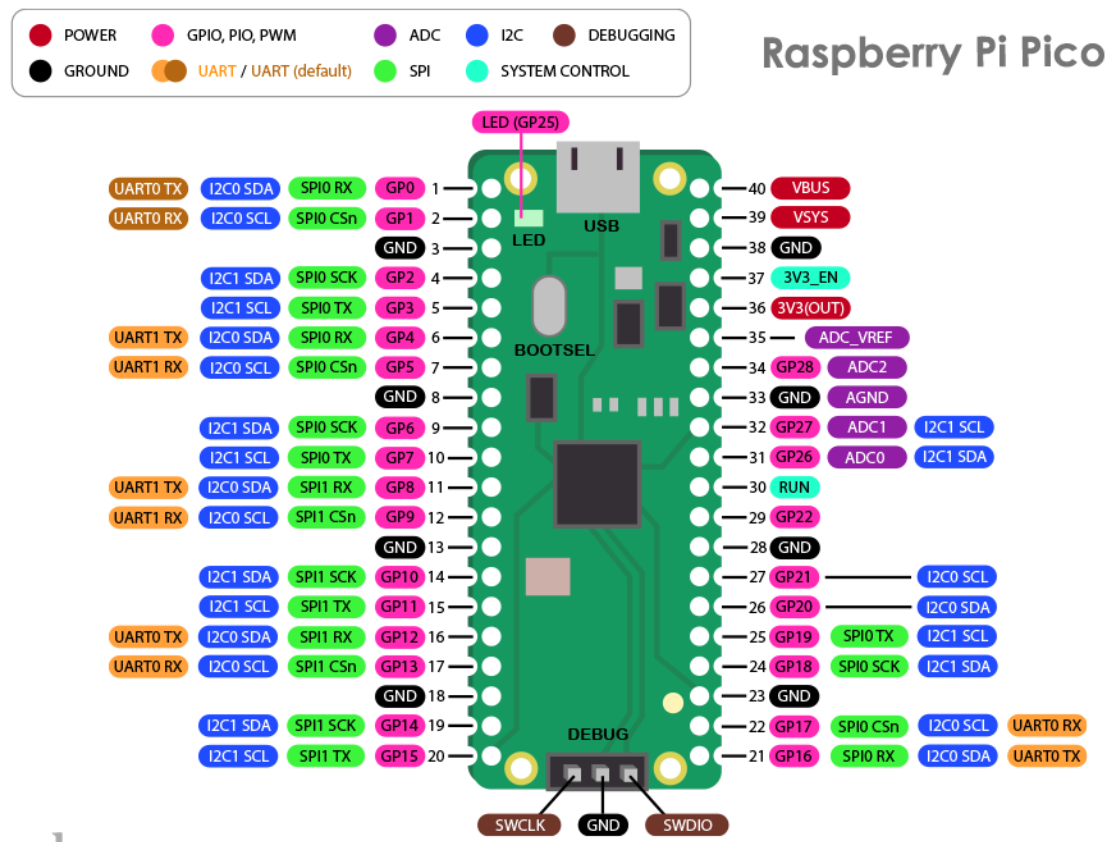
| Feature | Pi Pico | Pi Pico 2 |
|---|---|---|
| MCU | RP2040 | RP2350 |
| CPU | 2xCortex M0+, 133MHz | 2xCortex M33, 150MHz |
| Overclock | 240MHZ | 300MHz |
| RAM | 264kB | 512kB |
| Flash | External 2MB | External 4MB |
| GPIO | 26 | 26 |
| ADC | 12 bit | 12 bit |
| UART | 2 | 2 |
| I2C | 2 | 2 |
| SPI | 2 | 2 |
| Current | 25mA - 39mA | 21mA - 34mA |
| FPU | No | Yes |
#include <stdio.h>
#include "pico/stdlib.h"

int main() {
	static constexpr uint _LED_PIN = 25;

	stdio_init_all();

	gpio_init(_LED_PIN);
	gpio_set_dir(_LED_PIN, true);

	while (true) {
		printf("Hello, pico.\n");
		gpio_put(_LED_PIN, 1); // on
		sleep_ms(1000);
		gpio_put(_LED_PIN, 0); // off
	}
}
sudo apt update
sudo apt install cmake build-essential git wgetclub python3 gcc-arm-none-eabi libnewlib-arm-none-eabi
sdk_version=2.0.0
url=https://github.com/raspberrypi/pico-sdk
mkdir -p ~/pico
git clone $url --branch $sdk_version --recurse-submodules --shallow-submodules ~/pico/pico-sdk
export PICO_SDK_PATH="$HOME/pico/pico-sdk"
cmake_minimum_required(VERSION 3.20)

include($ENV{HOME}/pico/pico-sdk/external/pico_sdk_import.cmake)
project(pico-cpp LANGUAGES C CXX ASM)

pico_sdk_init()

add_library(warnings INTERFACE)
target_compile_options(warnings INTERFACE "-Wall" "-Wextra" "-Wno-psabi")

add_executable(hello
	hello.cpp
)
target_compile_features(hello PRIVATE cxx_std_20)
target_link_libraries(hello PRIVATE warnings pico_stdlib hardware_adc)
# Add other libraries: hardware_i2c

pico_enable_stdio_usb(hello 1)
pico_enable_stdio_uart(hello 0)
pico_add_extra_outputs(hello)
cmake -S . -B build
cmake --build build -j$(nproc)
Plug in Pico while pressing the program button. The copy and past the compiled UF2 file into the Pico’s drive.
You can see console output with:
screen /dev/ttyACM0 115200